# Welcome

Mito is the Web3 finance hub for crypto. It is built on Injective, offering lightning fast transaction times, the lowest fees, and an unparalleled gateway for DeFi as a whole.

The protocol provides users with a suite of DeFi products with a current focus on automated trading vaults and a launchpad platform for token generation events and liquidity bootstrapping.

**Mito’s goals for every user, regardless of financial background or experience level, are to:**

1. Provide institutional-grade financial tools that simplify both liquidity provisioning and advanced trading techniques.
2. Create a launchpad system to bootstrap projects in a sustainable and fair process for all parties.


# Protocol Overview

Mito Finance has two primary features: trading vaults and the launchpad platform.&#x20;

The automated trading vaults utilize sophisticated algorithms to make efficient markets that benefit both traders and liquidity providers.

<figure><img src="/files/YLPq52gkL3Ne2rWnyqCI" alt=""><figcaption><p>Vault Overview Page (test vault displayed)</p></figcaption></figure>

The launchpad platform creates a fair system for participants to access new tokens deployed on Injective, while also bootstrapping liquidity for nascent protocols through Mito automated vaults.

<figure><img src="/files/waBuGVaCp7Re2znzPGhw" alt=""><figcaption><p>Launchpad Page (test project displayed)</p></figcaption></figure>


# Value Propositions

How Mito sets itself apart

### **Automated Trading Vaults**

The diverse range of vaults employ advanced algorithms like the Avellaneda-Stoikov Market Making (ASMM) or Constant Product Marketing Making (CPMM) strategies, designed to deliver returns while minimizing risk. Users can select from a spectrum of strategies tailored to their needs and target returns.

### **Transparent Operations**

Mito offers full transparency. Access detailed performance data, on-chain contract addresses, and even the underlying logic of trading algorithms. Every single parameter is fully on-chain, allowing users to make informed data-driven decisions.

### **Vault Tokenization**

Each vault issues its own token representing your share of the underlying assets and accrued returns. These tokens simplify portfolio management and allow users to deposit for additional rewards.

### **Integration with Injective**

Built on Injective, Mito benefits from its robust infrastructure and low transaction fees. In addition, Injective’s orderbook in the Exchange Module powers omnichain liquidity across all facets of the broader dApp ecosystem.&#x20;

Mito’s launchpad platform serves as a base for both fair token launches and efficient liquidity bootstrapping. By being built on Injective, Mito vaults enjoy the power of a truly on-chain liquidity and one of the fastest growing ecosystems in all of crypto.

<br>


# Launchpad

## What is the Mito Finance Launchpad?

This is a platform designed for discovering and participating in new Injective projects. It offers a community-driven experience for both protocols seeking to raise capital and Injective users interested in contributing to the ecosystem.

The Mito Launchpad is able to bootstrap liquidity for new projects while also working in tandem with dApps across the Injective ecosystem from day one.&#x20;

## How does it work?

1. **Explore Upcoming Sales**\
   Browse through a list of upcoming token sales. Each listing provides you with all the details you need, including the project's goals, token metrics, and the terms of the sale.
2. **Community Vote** \
   Launchpad protocols must first be approved through the community voting platform.
3. **Project Research** \
   After approval, protocols will provide more key details about their token including the project goals, token metrics, and the terms of the sale.&#x20;
4. **Obtain Whitelist NFT/Stake INJ**\
   Depending on the project, unique NFTs or staking INJ in its validator pool will be necessary for participation in its launchpad.&#x20;
5. **Deposit INJ**\
   After obtaining a whitelist, users must deposit INJ within the specified deposit window on the Mito launchpad page.&#x20;
6. **Receive 50/50 Distribution**

   Once the sale is complete, participants will receive an allocation in the following structure:

   50% in Project Tokens: Half of your allocation will be the tokens of the launchpad project.

   50% in Vault Tokens: Half of your allocation will be in Mito Vault Liquidity Provider tokens, representing a stake in a market-making vault that supports the project's trading activity. There are no lock-ups or fees on this allocation.

   **Note:** if the project does not manage to raise a set minimum amount as designated on its launchpad page, participants will receive a 100% refund on their deposited tokens.&#x20;

   <br>


# Key Features

The key features of Mito's Launchpad includes:&#x20;

* **Community Voting:** Mito's launchpad ensures a level playing field with equitable token distribution methods.
* **Whitelist Mechanism:** All sales will have a whitelist process to ensure dedicated or invested community members get early access.
* **Transparent Terms:** Clear and concise information about each sale, including price, total supply, and distribution schedules.
* **Ecosystem Liquidity Support:** After launch, protocols obtain much-needed liquidity to allow trading on their token. Furthermore, liquidity is set on the Injective orderbook, allowing all front-ends, such as Helix, to begin trading on that liquidity.


# How Does It Work?

1. **Explore Upcoming Sales**\
   Browse through a list of upcoming token sales. Each listing provides you with all the details you need, including the project's goals, token metrics, and the terms of the sale.
2. **Community Vote** \
   Launchpad protocols must first be approved through the community voting platform.
3. **Project Research** \
   After approval, protocols will provide more key details about their token including the project goals, token metrics, and the terms of the sale.&#x20;
4. **Obtain Whitelist NFT/Stake INJ**\
   Depending on the project, unique NFTs or staking INJ in its validator pool will be necessary for participation in its launchpad.&#x20;
5. **Deposit INJ**\
   After obtaining a whitelist, users must deposit INJ within the specified deposit window on the Mito launchpad page.&#x20;
6. **Receive 50/50 Distribution**

   Once the sale is complete, participants will receive an allocation in the following structure:

   50% in Project Tokens: Half of your allocation will be the tokens of the launchpad project.

   50% in Vault Tokens: Half of your allocation will be in Mito Vault Liquidity Provider tokens, representing a stake in a market-making vault that supports the project's trading activity. There are no lock-ups or fees on this allocation.

**Note:** if the project does not manage to raise a set minimum amount as designated on its launchpad page, participants will receive a 100% refund on their deposited tokens.&#x20;


# Launchpad Eligibility

Eligibility for Mito's Launchpad program is determined individually by each project, offering a tailored approach to participation.&#x20;

Projects can establish their own eligibility requirements, which can vary widely and include, but is not limited to, staking or holding an NFT, or the project may choose to not have a restriction at all.&#x20;

Users can easily access information about eligibility criteria by visiting the Project Overview page on Mito's Launchpad feature and looking at the “Subscription Requirements”.&#x20;

<figure><img src="/files/0y98Hdy1ZlwlRJs41xMz" alt=""><figcaption><p>Subscription Requirements</p></figcaption></figure>

Here, they will find detailed information on the specific requirements set by each project, including the exact timestamp of the snapshot taken to determine eligible wallets.&#x20;

Each project also sets the maximum subscription allocation per address, which is also viewable on the Launchpad project page under “Max Subscription Allocation Per Address”.&#x20;

<figure><img src="/files/XbvjEEIic9dwbWHjohKa" alt=""><figcaption><p>Max Subscription Allocation Per Address</p></figcaption></figure>

On the Launchpad project page, users will be able to view their eligibility by seeing either a “Subscribe Now” or “Not Whitelisted” button.

<figure><img src="/files/35H1K5Yrvy4JzAmuKCvp" alt=""><figcaption></figcaption></figure>

Should you believe you are seeing a "Not Whitelisted" button in error, please reach out to Mito's Community Managers on the [Discord Server](https://discord.com/invite/mitofi).


# Launchpad Subscription Model

The Mito Launchpad operates under a subscription model, offering three potential scenarios. For this overview, QUNT will be utilized as an example.&#x20;

## Scenario 1: Subscription Goal is Met

If the total subscription goal is reached, participants will receive 50% of their allocation in QUNT tokens, with the remaining 50% used to establish an automated trading vault aimed at fostering robust liquidity.

Participants will be granted QUNT-INJ LP tokens, representing their holdings, which they can redeem or stake immediately following the subscription period's conclusion.

## Scenario 2: Subscription Goal is Not Met

If the total subscription goal is not met, all participants will receive a full refund of their tokens after the subscription period.

## Scenario 3: Subscription Goal is Exceeded

If the total subscription goal is exceeded and oversubscribed, participants will receive a pro-rata share of their allocation.&#x20;

For instance, if a participant subscribes to the Launchpad with $10, but the goal is exceeded by a factor of 5, they will receive an $8 refund in the original asset they initially subscribed with. The remaining $2 will be allocated to the participant, with 50% given as QUNT tokens and 50% deposited into an automated trading vault.

Whitelisted participants will be able to subscribe up until the subscription time concludes.&#x20;

Participants will receive QUNT-INJ LP tokens to represent their holdings in that vault, which can be redeemed or staked immediately following the subscription period's conclusion.


# Launchpad Subscription Conclusion

When the Launchpad subscription concludes, 50% of the allocation will be given via the project token and the remaining 50% will be allocated to a newly created automated trading vault for that token. Users will receive an LP token to represent their holdings for that trading vault.&#x20;

Users will be able to withdraw their assets from the vault at any time or stake them for additional rewards.&#x20;

To access their assets once the Launchpad subscription concludes, users simply need to click the “Claim Tokens” button on the Launchpad overview page.&#x20;

<figure><img src="/files/tf2QLEh5NMYVO0qjk9jI" alt=""><figcaption><p>Launchpad Page (test project displayed)</p></figcaption></figure>

Users can also verify if the claim has been competed by checking their “Portfolio” on Mito.&#x20;


# Non-Whitelisted Users

How to participate in Mito's Launchpad projects if you are a non-whitelisted user.

Following the conclusion of a Launchpad subscription, a trading vault is immediately created on Mito, allowing all users to engage in the market and gain access to the newly minted asset.&#x20;

By entering this trading vault, users actively support the liquidity of the market, fostering its stability and growth. Users will also have the option to stake their LP tokens to potentially earn further rewards.

Alternatively, users can immediately begin trading on the newly created market on any of the exchange dApps, such as Helix, built on Injective.


# Automated Vaults

Mito’s automated vaults employ sophisticated algorithms to execute various trading strategies, aiming to generate returns and manage risks within predetermined parameters.

Instead of the traditional liquidity model, which typically follows a continuous curve by the formula x\*y=k, Mito’s automated vaults create discrete orderbook liquidity positions.

<figure><img src="/files/zn8oHe4pPGNpsIkQTsdu" alt=""><figcaption><p>The standard CPMM Liquidity Model</p></figcaption></figure>

### Key Features of the Automated Vaults

* **Diverse Strategies:** A range of vaults catering to different risk tolerances and target returns is available, depending on asset and vault type.&#x20;
* **Vault Transparency:** Data for each vault is clearly displayed with the various underlying mathematical models and historical performance of each strategy since its inception.
* **Vault Tokenization:** Users receive vault tokens representing their proportional share of the underlying assets and accrued profits within each vault. These tokens may be staked for additional rewards.&#x20;
* **Dynamic Order Management:** The automated vaults interact with protocols in the Injective ecosystem such as Helix by placing limit orders based on the chosen strategy and real-time market conditions. Orders are adjusted and rebalanced automatically to maintain optimal exposure and capture opportunities.

Participation in automated vaults involves exposure to inherent risks associated with crypto markets, including price volatility, technical issues, and smart contract security vulnerabilities. Users should carefully assess these risks and conduct thorough research before depositing funds into any vault.

For specific details about individual automated vault strategies, performance data, and risk considerations, please refer to the dedicated sections within the documentation.

<br>


# CPMM Automated Vaults

### Thesis

This vault strategy is most suited for depositors who are looking to earn automated boosted returns on their assets without constant position management or short-term price risks.

Essentially this vault is best for users who believe:

* The vault asset(s) will trend upward in the long term.
* Returns from swap volume will remain steady over time.
* Boosted earnings will outweigh the potential risks of impermanent loss.

This vault is not ideal for users with higher risk-reward profiles.

### Overview

By creating a liquidity pair between two digital assets, the vault generates returns through discrete buy-sell orders on Injective’s on-chain orderbook in the Exchange Module.&#x20;

<figure><img src="/files/7n4y7HE0bwhn1DReV3EP" alt=""><figcaption><p>The CPMM strategy reimagined on an orderbook exchange</p></figcaption></figure>

Additionally, depositors can earn extra rewards on their vault positions by staking their LP Tokens via Mito’s Staking section.&#x20;

### Implementation

<figure><img src="/files/y8EtdYxzo2SCMcQmMkE8" alt=""><figcaption></figcaption></figure>

1. **Choose a Vault:** Users select a CPMM vault based on their investment goals and risk tolerance.
2. **Deposit Assets:** Users deposit supported assets (e.g., INJ and USDT) into the chosen vault.
3. **Automated Trading:** The vault uses the deposited assets to create a liquidity pair on the Injective orderbook and executes automated buy and sell orders based on its predetermined parameters.
4. **Earn Trading Revenue:** Users earn a share of the PnL generated by the vault's trading activity, reflected in the increasing value of their Vault Tokens.&#x20;
5. **Staking for Rewards:** Users can further boost their rewards by staking their LP Tokens in Mito's Staking section.
6. **Withdraw Funds:** Users can withdraw their assets and any accrued fees at any time.

### Vault Fee System

Vault fees comes from trading volume of the underlying market. The vault places limit orders on the order book with a configurable spread (from 0.2% - 1%) between lowest sell order and highest buy order, which brings trading revenue to the vault. Moreover, the underlying market has a negative maker fee rebate. In most cases, this allows a 0.01% fee per trade.&#x20;

**Note:** Potential fees are not “autocompounded” to the individual position, but will instead be added to overall vault’s value. Then when a user withdraws they can take out their portion of the earned fees through this added value.

### Potential Risks

* Mito smart contract risks or bugs
* Impermanent loss when returns do not outweigh the price appreciation/depreciation over time
* Consistent lack of volume on the trading pair which may lead to low returns

<br>


# Rewards

Mito’s Reward feature provides additional rewards to users who stake their LP tokens, further contributing to the liquidity of the asset within the Injective ecosystem.&#x20;

Each vault will feature its own dedicated rewards pool and will operate on a gauge system. Every week, a new gauge will begin, refreshing the rewards available across the entire vault.&#x20;

Users will receive rewards in proportion to the total amount staked within that vault, and the rewards are claimable at any time.


# Permissionless Vaults

In this document, you will learn to permissionlessly create your own vault on Mito.It is ***highly*** suggested to carefully read and understand this ***entire*** guide before creating a Vault.

* Every new Vault must be linked to an existing INJ quoted market ID. More than one market ID cannot be used for more than one Vault on Mito.
* Once created, the new vault will not be automaticly swapable on the Mito Swap interface.
* A vault creation incurs a non-refundable fee of 10 INJ.
  * The entire fee is allocated to cover the costs associated with generating orders by the vault.
* During the vault creation process, a minimum first subscription of 50 INJ worth of base and quote assets is required to establish initial liquidity.

## How to Create a Permissionless Vault <a href="#how-to-create-a-permissionless-vault" id="how-to-create-a-permissionless-vault"></a>

### **1 - Market Selection & Vault Details**

The first step is to select a market. Only INJ-quoted markets are allowed.&#x20;

New markets can be created using [TokenStation](https://www.tokenstation.app/market). All chain markets can be viewed at the [Injective Explorer](https://explorer.injective.network/markets/), though only INJ-quoted markets can be used to create permissionless vaults.&#x20;

#### **Vault Configuration**

During the creation process, the vault creator can set the following configuration:

* **Notional Value Cap:** The notional value cap defines the maximum value of the vault's funds. Once this cap is reached, no new subscriptions will be allowed.

Once the vault is created and running, additional parameters can be changed. The predefined values are selected to ensure the best starting parameters, providing an optimal user experience for both project owners and subscribers.

<figure><img src="/files/WYp0oGYNXladfVi2scOY" alt=""><figcaption></figcaption></figure>

### **2 - Price & initial liquidity**

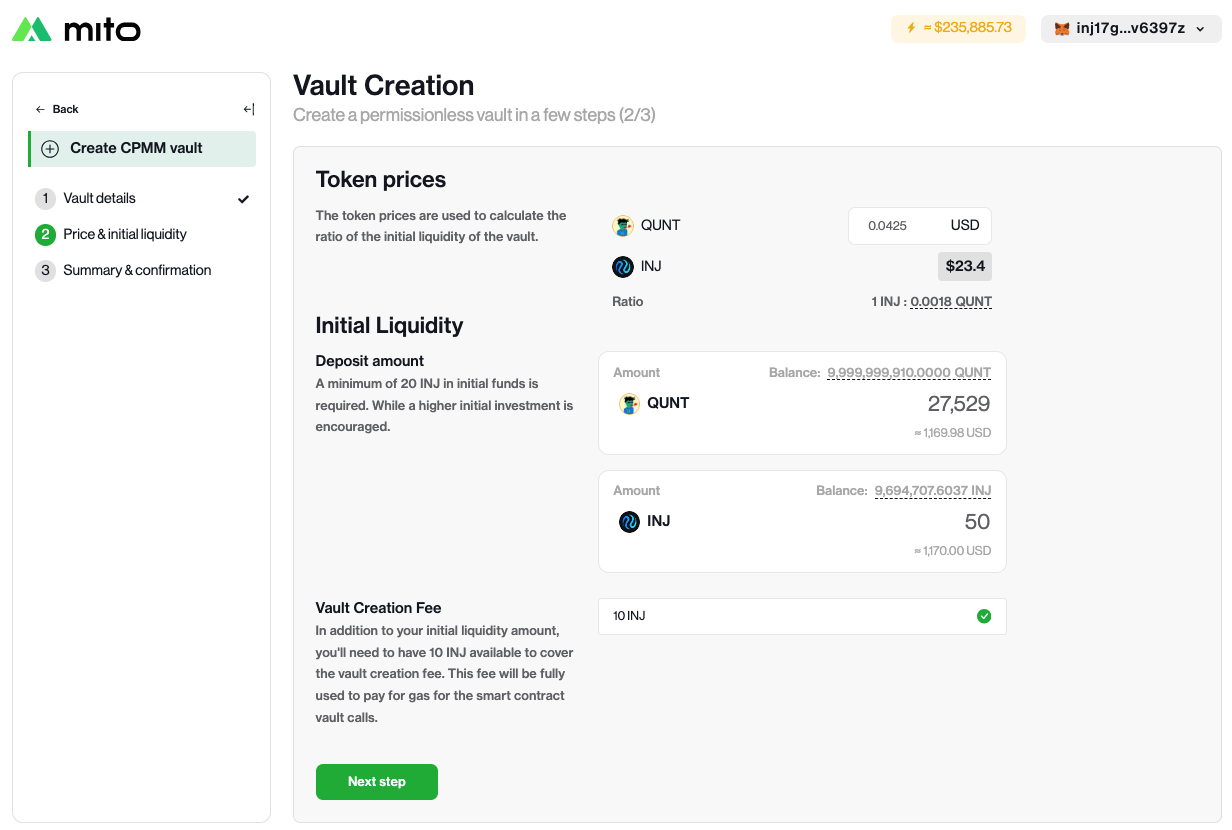
#### **Token Price**

To determine the initial token price, Mito will use the last traded price on that market. If there is no last traded price, the vault creator can set the price quoted in USD. The vault will then set the price in relation to the last traded price of INJ/USDT.&#x20;

#### **Initial Liquidity**

The deposit amount represents the initial funds that the vault will use to start running the strategy and place orders. A minimum of 20 INJ in initial funds is required, though a higher initial investment is encouraged.&#x20;

**Vault Creation Fee**

In addition to your initial liquidity amount, you need to have 10 INJ available to cover the vault creation fee. This fee will be fully used to pay for gas for the smart contract vault calls.

<figure><img src="https://files.gitbook.com/v0/b/gitbook-x-prod.appspot.com/o/spaces%2FoaFrsrN8wb4tubFuz44J%2Fuploads%2FXFBJi2vgURKYAiNI3gT6%2Fimage.png?alt=media&#x26;token=e730363c-ae2f-4cfb-a8bd-238cf87b0ba9" alt=""><figcaption></figcaption></figure>


# Launchpad Creation Guide

This guide provides a comprehensive walkthrough for setting up a token launchpad on Mito.fi.

## Introduction

The Mito Launchpad is a permissionless platform that allows project owners to create token sales with ease. Whether you're launching a new token or raising funds for an existing project, this guide will help you navigate the setup process step by step.

## How to Create a Launchpad

### 1. Market Selection

* **Market**: Use the dropdown menu to select the appropriate market for your token.&#x20;
  * :information\_source: Note that only INJ-quoted markets are currently supported on Mito.&#x20;
* **Token Denomination:** Double-check that your token's base denomination matches the selected market to ensure a successful launchpad creation.

### 2. Project Website Link

* Provide a link to your project’s website or a page that explains your project in detail.
  * Mito does not store this information.

### 3. Sales Parametres

* **Total Tokens for Sale**: Specify the exact amount of tokens available to sell in the launchpad.&#x20;
* **Target Raise Amount**: Set your fundraising goal in USD 
* **Maximum Contribution**: Define the maximum INJ amount per address
  * :information\_source: Consider the maximum contribution per address to manage token distribution and prevent excessive concentration of ownership.&#x20;
* **Launchpad date:** Period when the users can subscribe to the launchpad.&#x20;

### 4. Whitelisting (Optional)

* **Enable Whitelist:** Restrict participation to specific addresses. Useful for rewarding early supporters or private sales.
* **Adding Addresses**: If enabled, add whitelisted addresses directly on the launchpad page after creation.  Without added addresses, subscriptions are unavailable.

### 5. Launchpad Details & Fees

* **Token Price**: The token price is determined based on whether your market is already trading on Mito.
  * **Trading Market**: Mito will use the current order book price.
  * **New** **Market:** The launchpad creator will establish the initial token price
    * Important Considerations: Ensure the price you set adheres to the minimum price and quantity tick sizes for the market to be tradable. These values ensure your token can be properly listed and traded.
* **Launchpad & Vault Creation Fee**: 5 INJ covers launchpad, vault creation, keeping the vault trading.
* **Receiving Token Format**: Project owners receive 50% in *YOUR\_TOKEN*-INJ LP tokens and 50% in INJ.


# Vault Creation Guide

In this document, you will learn to permissionlessly create your own vault on Mito.It is ***highly*** suggested to carefully read and understand this ***entire*** guide before creating a Vault.

* Every new Vault must be linked to an existing INJ quoted market ID. More than one market ID cannot be used for more than one Vault on Mito.
* Once created, the new vault will not be automaticly swapable on the Mito Swap interface.
* A vault creation incurs a non-refundable fee of 10 INJ.
  * The entire fee is allocated to cover the costs associated with generating orders by the vault.
* During the vault creation process, a minimum first subscription of 50 INJ worth of base and quote assets is required to establish initial liquidity.

## How to Create a Permissionless Vault <a href="#how-to-create-a-permissionless-vault" id="how-to-create-a-permissionless-vault"></a>

### **1 - Market Selection & Vault Details**

The first step is to select a market. Only INJ-quoted markets are allowed.&#x20;

New markets can be created using [TokenStation](https://www.tokenstation.app/market). All chain markets can be viewed at the [Injective Explorer](https://explorer.injective.network/markets/), though only INJ-quoted markets can be used to create permissionless vaults.&#x20;

#### **Vault Configuration**

During the creation process, the vault creator can set the following configuration:

* **Notional Value Cap:** The notional value cap defines the maximum value of the vault's funds. Once this cap is reached, no new subscriptions will be allowed.

Once the vault is created and running, additional parameters can be changed. The predefined values are selected to ensure the best starting parameters, providing an optimal user experience for both project owners and subscribers.

<figure><img src="/files/WYp0oGYNXladfVi2scOY" alt=""><figcaption></figcaption></figure>

### **2 - Price & initial liquidity**

#### **Token Price**

To determine the initial token price, Mito will use the last traded price on that market. If there is no last traded price, the vault creator can set the price quoted in USD. The vault will then set the price in relation to the last traded price of INJ/USDT.&#x20;

#### **Initial Liquidity**

The deposit amount represents the initial funds that the vault will use to start running the strategy and place orders. A minimum of 20 INJ in initial funds is required, though a higher initial investment is encouraged.&#x20;

**Vault Creation Fee**

In addition to your initial liquidity amount, you need to have 10 INJ available to cover the vault creation fee. This fee will be fully used to pay for gas for the smart contract vault calls.

<figure><img src="https://files.gitbook.com/v0/b/gitbook-x-prod.appspot.com/o/spaces%2FoaFrsrN8wb4tubFuz44J%2Fuploads%2FXFBJi2vgURKYAiNI3gT6%2Fimage.png?alt=media&#x26;token=e730363c-ae2f-4cfb-a8bd-238cf87b0ba9" alt=""><figcaption></figcaption></figure>


# Launchpad

This document aims to allow external developers to integrate with Mito's Launchpad from within their dApps. We will only show the message examples, how will you integrate them within your dApp is your own choice. Documentation on broadcasting the transactions containing these messages can be found [here](https://docs.ts.injective.network/transactions/msgbroadcaster#msgbroadcaster--wallet-strategy).

### Query

#### Fetch Launchpad Details

```typescript
import { IndexerGrpcMitoApi } from '@injectivelabs/sdk-ts'

const MITO_API_ENDPOINT = 'https://k8s.mainnet.mito.grpc-web.injective.network' /** for mainnet */
const mitoApi = new IndexerGrpcMitoApi(MITO_API_ENDPOINT)

const address = 'inj1..'
const LAUNCHPAD_CONTRACT_ADDRESS = 'inj1..'

const { ido: launchpad } = await mitoApi.fetchIDO({
    contractAddress: LAUNCHPAD_CONTRACT_ADDRESS,
    accountAddress: address
})

console.log(launchpad)
```

### Transactions

#### Subscribe to Launchpad

```typescript
import { 
  MsgExecuteContractCompat,
  spotQuantityToChainQuantityToFixed 
} from '@injectivelabs/sdk-ts'

const sender = `inj1...`
const amount = 0.01 /** subscribing 0.01 INJ */
const quoteTokenDenom = 'inj' /** if the launchpad is quoted in INJ */
const quoteTokenDecimals = 18
const contractAddress = `inj1..` /** launchpad contract address */

const message = MsgExecuteContractCompat.fromJSON({
  sender,
  funds: [
    {
      denom: quoteTokenDenom,
      amount: spotQuantityToChainQuantityToFixed({
        value: amount,
        baseDecimals: quoteTokenDecimals
      })
    }
  ],
  contractAddress,
  exec: {
    action: 'Subscribe',
    msg: {}
  }
})

/** (Prepare) Broadcast the transaction */
```

#### Claim Launchpad Subscription

```typescript
import { 
  MsgExecuteContractCompat
} from '@injectivelabs/sdk-ts'

const sender = `inj1...`
const contractAddress = `inj1..` /** launchpad contract address */

const message = MsgExecuteContractCompat.fromJSON({
  sender,
  contractAddress,
  exec: {
    action: 'Claim',
    msg: {}
  }
})

/** (Prepare) Broadcast the transaction */
```


# Automated Vaults

This document aims to allow external developers to integrate with Mito's Vaults from within their dApps. We will only show the message examples, how will you integrate them within your dApp is your own choice. Documentation on broadcasting the transactions containing these messages can be found [here](https://docs.ts.injective.network/transactions/msgbroadcaster#msgbroadcaster--wallet-strategy).

### Query

#### Fetch Vaults

```typescript
import { IndexerGrpcMitoApi } from '@injectivelabs/sdk-ts'

const MITO_API_ENDPOINT = 'https://k8s.mainnet.mito.grpc-web.injective.network' /** for mainnet */
const mitoApi = new IndexerGrpcMitoApi(MITO_API_ENDPOINT)

const VAULT_CONTRACT_ADDRESS = 'inj1..'

const { ido: launchpad } = await mitoApi.fetchVault({
    contractAddress: VAULT_CONTRACT_ADDRESS,
})

console.log(launchpad)
```

#### Fetch LP Holders

```typescript
import { IndexerGrpcMitoApi } from '@injectivelabs/sdk-ts'

const MITO_API_ENDPOINT = 'https://k8s.mainnet.mito.grpc-web.injective.network' /** for mainnet */
const mitoApi = new IndexerGrpcMitoApi(MITO_API_ENDPOINT)

const VAULT_CONTRACT_ADDRESS = 'inj1..'
const STAKING_CONTRACT_ADDRESS = `inj1gtze7qm07nky47n7mwgj4zatf2s77xqvh3k2n8` /** staking contract address for mainnet */

const { holders } = await mitoApi.fetchLPHolders({
    vaultAddress: VAULT_CONTRACT_ADDRESS,
    stakingContractAddress: STAKING_CONTRACT_ADDRESS,
})

console.log(launchpad)
```

### Transactions

#### Subscribe to Spot Vault

```typescript
import { 
  MsgPrivilegedExecuteContract,
  getDefaultSubaccountId,
  ExecPrivilegedArgVaultSubscribe,
  spotQuantityToChainQuantityToFixed 
} from '@injectivelabs/sdk-ts'

enum VaultContractType {
  ManagedVault = 'crates.io:managed-vault',
  CPMM = 'crates.io:vault-cpmm-spot',
  ASMMSpot = 'crates.io:vault-asmm-spot',
  ASMMPerp = 'crates.io:vault-asmm-perp'
}

enum SpotRedemptionType {
  BaseOnly = 'BaseOnly',
  QuoteOnly = 'QuoteOnly',
  BaseAndQuote = 'BaseAndQuote',
  FixedBaseAndQuote = 'FixedBaseAndQuote',
  VariableBaseAndQuote = 'VariableBaseAndQuote'
}

/** For example QUNT/INJ market, it's recommended to fetch the market from chain */
const market = {
  baseDenom: 'factory/...',
  baseDecimals: 6,
  quoteDecimals: 18,
  quoteDenom 'INJ'
}
const sender = `inj1...`
const baseAmount = 10000 /** subscribing 1000 QUNT */
const quoteAmount = 0.15 /** subscribing 0.15 INJ */
const vaultSubaccountId = '0x..' /* fetched from Vault details */
const slippage = {
  max_penalty: '0.1'
}
const VAULT_MASTER_ADDRESS = 'inj1..' /* fetched from Vault details */

const data = ExecPrivilegedArgVaultSubscribe.fromJSON({
  args: vault.vaultType === VaultContractType.CPMM ? { slippage } : {},
  origin: sender,
  vaultSubaccountId,
  traderSubaccountId: getDefaultSubaccountId(sender),
})

const formattedBaseAmount =
  subscriptionType !== SpotRedemptionType.QuoteOnly
    ? `${spotQuantityToChainQuantityToFixed({
        value: baseAmount,
        baseDecimals: market.baseDecimals
      })} ${market.baseDenom}`
    : ''

const formattedQuoteAmount =
  subscriptionType !== SpotRedemptionType.BaseOnly
    ? `${spotQuantityToChainQuantityToFixed({
        value: quoteAmount,
        baseDecimals: market.quoteDecimals
      })} ${market.quoteDenom}`
    : ''

const funds = [formattedBaseAmount, formattedQuoteAmount]
  .filter((amount) => amount)
  .join(', ')

const message = MsgPrivilegedExecuteContract.fromJSON({
  data,
  sender,
  funds,
  contractAddress: VAULT_MASTER_ADDRESS,
})

/** (Prepare) Broadcast the transaction */
```

#### Subscribe to Derivative Vault

```typescript
import { 
  MsgPrivilegedExecuteContract,
  getDefaultSubaccountId,
  ExecPrivilegedArgVaultSubscribe,
  spotQuantityToChainQuantityToFixed 
} from '@injectivelabs/sdk-ts'

enum VaultContractType {
  ManagedVault = 'crates.io:managed-vault',
  CPMM = 'crates.io:vault-cpmm-spot',
  ASMMSpot = 'crates.io:vault-asmm-spot',
  ASMMPerp = 'crates.io:vault-asmm-perp'
}

const marketQuoteDenom = 'peggy0x..' /** for BTC/USDT Perp it's USDT denom */
const marketQuoteDecimals = 6 /** fetched from the Vault's associated market quote asset, for BTC/USDT Perp it's USDT and it's decimals are 6 */
const sender = `inj1...`
const subscribeAmount = 0.01 /** subscribing 0.01 INJ */
const vaultSubaccountId = '0x..' /* fetched from Vault details */
const slippage = {
  max_penalty: '0.1'
}
const VAULT_MASTER_ADDRESS = 'inj1..' /* fetched from Vault details */

const data = ExecPrivilegedArgVaultSubscribe.fromJSON({
  args: vault.vaultType === VaultContractType.CPMM ? { slippage } : {},
  origin: sender,
  vaultSubaccountId,
  traderSubaccountId: getDefaultSubaccountId(sender),
})

const amount = spotQuantityToChainQuantityToFixed({
  value: subscribeAmount,
  baseDecimals: vault.market.quoteToken.decimals
})

const message = MsgPrivilegedExecuteContract.fromJSON({
  data,
  sender,
  contractAddress: VAULT_MASTER_ADDRESS,
  funds: `${amount} ${marketQuoteDenom}`
})

/** (Prepare) Broadcast the transaction */
```

#### Redeem Subscription

```typescript
import { 
  MsgPrivilegedExecuteContract,
  getDefaultSubaccountId,
  ExecPrivilegedArgVaultRedeem,
  spotQuantityToChainQuantityToFixed 
} from '@injectivelabs/sdk-ts'

enum VaultContractType {
  ManagedVault = 'crates.io:managed-vault',
  CPMM = 'crates.io:vault-cpmm-spot',
  ASMMSpot = 'crates.io:vault-asmm-spot',
  ASMMPerp = 'crates.io:vault-asmm-perp'
}

enum DerivativeRedemptionType {
  QuoteOnly = 'QuoteOnly',
  PositionAndQuote = 'PositionAndQuote'
}

enum SpotRedemptionType {
  BaseOnly = 'BaseOnly',
  QuoteOnly = 'QuoteOnly',
  BaseAndQuote = 'BaseAndQuote',
  FixedBaseAndQuote = 'FixedBaseAndQuote',
  VariableBaseAndQuote = 'VariableBaseAndQuote'
}

enum VaultMarketType {
  Spot = 'Spot',
  Derivative = 'Derivative'
}

const vaultLpDenom = 'factory...' /* fetched from Vault details */
const vaultBaseDecimals = 18
const sender = `inj1...`
const redeemAmount = 0.01 /** subscribing 0.01 INJ */
const vaultSubaccountId = '0x..' /* fetched from Vault details */
const slippage = {
  max_penalty: '0.1'
}
const VAULT_MASTER_ADDRESS = 'inj1..' /* fetched from Vault details */
const redemptionType: SpotRedemptionType | DerivativeRedemptionType = 1 /** SpotRedemptionMap.BaseOnly */
const subscriptionMarketType = VaultMarketType.Spot

const data = ExecPrivilegedArgVaultRedeem.fromJSON({
  origin: sender,
  vaultSubaccountId,
  traderSubaccountId: getDefaultSubaccountId(sender),
  args: {
    ...(subscriptionMarketType === VaultMarketType.Derivative
      ? { slippage }
      : {}),
    redemption_type: redemptionType
  }
})

const amount = spotQuantityToChainQuantityToFixed({
  value: redeemAmount,
  baseDecimals: vaultBaseDecimals
})

const message = MsgPrivilegedExecuteContract.fromJSON({
  data,
  sender,
  contractAddress: VAULT_MASTER_ADDRESS,
  funds: `${amount} ${subscription.vaultInfo.lpDenom}`
})

/** (Prepare) Broadcast the transaction */
```


# Rewards

This document aims to allow external developers to integrate with Mito's LP Staking Rewards from within their dApps. We will only show the message examples, how will you integrate them within your dApp is your own choice. Documentation on broadcasting the transactions containing these messages can be found [here](https://docs.ts.injective.network/transactions/msgbroadcaster#msgbroadcaster--wallet-strategy).

### Query

#### Fetch Staking Rewards

```typescript
import { IndexerGrpcMitoApi } from '@injectivelabs/sdk-ts'

const MITO_API_ENDPOINT = 'https://k8s.mainnet.mito.grpc-web.injective.network' /** for mainnet */
const mitoApi = new IndexerGrpcMitoApi(MITO_API_ENDPOINT)

const address = 'inj1..'
const STAKING_CONTRACT_ADDRESS = `inj1gtze7qm07nky47n7mwgj4zatf2s77xqvh3k2n8` /** staking contract address for mainnet */

const { rewards } = await mitoApi.fetchStakingRewardsByAccount({
    stakingContractAddress: STAKING_CONTRACT_ADDRESS,
    accountAddress: address
})

console.log(rewards)
```

#### Fetch Staking Pools

```typescript
import { IndexerGrpcMitoApi } from '@injectivelabs/sdk-ts'

const MITO_API_ENDPOINT = 'https://k8s.mainnet.mito.grpc-web.injective.network' /** for mainnet */
const mitoApi = new IndexerGrpcMitoApi(MITO_API_ENDPOINT)

const address = 'inj1..'
const STAKING_CONTRACT_ADDRESS = `inj1gtze7qm07nky47n7mwgj4zatf2s77xqvh3k2n8` /** staking contract address for mainnet */

const { pools } = await mitoApi.fetchStakingPools({
    stakingContractAddress: STAKING_CONTRACT_ADDRESS
})

console.log(pools)
```

### Transactions

#### Stake LP

```typescript
import { 
  MsgExecuteContractCompat,
  spotQuantityToChainQuantityToFixed 
} from '@injectivelabs/sdk-ts'

const sender = `inj1...`
const amount = 0.01 /** staking 0.01 QUNT/INJ LP */
const vaultLpDenom = 'factory...' /** Can be fetched from the vault's information */
const vaultTokenDecimals = 18
const STAKING_CONTRACT_ADDRESS = `inj1gtze7qm07nky47n7mwgj4zatf2s77xqvh3k2n8` /** staking contract address for mainnet */

const message = MsgExecuteContractCompat.fromJSON({
  sender,
  funds: [
    {
      denom: vaultLpDenom,
      amount: spotQuantityToChainQuantityToFixed({
        value: amount,
        baseDecimals: vaultTokenDecimals
      })
    }
  ],
  contractAddress: STAKING_CONTRACT_ADDRESS,
  exec: {
    action: 'stake',
    msg: {}
  }
})

/** (Prepare) Broadcast the transaction */
```

#### Unstake LP

*Note: The users need to* [*Claim Stake*](#claim-stake) *24 hours after they unstaked their LP.*

```typescript
import { 
  MsgExecuteContractCompat,
  spotQuantityToChainQuantityToFixed 
} from '@injectivelabs/sdk-ts'

const sender = `inj1...`
const amount = 0.01 /** unstaking 0.01 QUNT/INJ LP */
const vaultLpDenom = 'factory...' /** Can be fetched from the vault's information */
const vaultTokenDecimals = 18
const STAKING_CONTRACT_ADDRESS = `inj1gtze7qm07nky47n7mwgj4zatf2s77xqvh3k2n8` /** staking contract address for mainnet */

const message = MsgExecuteContractCompat.fromJSON({
  sender,
  contractAddress: STAKING_CONTRACT_ADDRESS,
  exec: {
    action: 'unstake',
    msg: {
      coin: {
        denom: vault.lpDenom,
        amount: spotQuantityToChainQuantityToFixed({
          value: amount,
          baseDecimals: vaultTokenDecimals
        })
      }
    }
  }
})

/** (Prepare) Broadcast the transaction */
```

#### Claim Stake

```typescript
import { 
  MsgExecuteContractCompat 
} from '@injectivelabs/sdk-ts'

const sender = `inj1...`
const vaultLpDenom = 'factory...' /** Can be fetched from the vault's information */
const STAKING_CONTRACT_ADDRESS = `inj1gtze7qm07nky47n7mwgj4zatf2s77xqvh3k2n8` /** staking contract address for mainnet */

const message = MsgExecuteContractCompat.fromJSON({
  sender,
  contractAddress: STAKING_CONTRACT_ADDRESS,
  exec: {
    action: 'claim_stake',
    msg: {
      lp_token: vaultLpDenom
    }
  }
})

/** (Prepare) Broadcast the transaction */
```

#### Claim Rewards

```typescript
import { 
  MsgExecuteContractCompat 
} from '@injectivelabs/sdk-ts'

const sender = `inj1...`
const vaultLpDenom = 'factory...' /** Can be fetched from the vault's information */
const STAKING_CONTRACT_ADDRESS = `inj1gtze7qm07nky47n7mwgj4zatf2s77xqvh3k2n8` /** staking contract address for mainnet */

const message = MsgExecuteContractCompat.fromJSON({
  sender,
  contractAddress: STAKING_CONTRACT_ADDRESS,
  exec: {
    action: 'claim_rewards',
    msg: {
      lp_token: vaultLpDenom
    }
  }
})
```


# Permissionless Vaults

This document aims to allow external developers to integrate with Mito's Permissionless Vaults from within their dApps. We will only show the message examples, how will you integrate them within your dApp is your own choice.

## Instantiating a CPMM Vault

To instantiate a CPMM vault, you will need to set up the necessary environment, configure your wallet, and broadcast the instantiation message. Below is an example of how to instantiate a CPMM vault using the Injective Labs SDK.

```javascript
import { NETWORK } from '@injectivelabs/networks'
import { MsgBroadcaster } from "@injectivelabs/wallet-ts"
import {
  Coin,
  toUtf8,
  toBase64,
  IndexerGrpcMitoApi,
  ChainGrpcTokenFactoryApi,
  MsgExecuteContractCompat,
} from "@injectivelabs/sdk-ts";

export const msgBroadcastClient = new MsgBroadcaster({
  walletStrategy /* instantiated wallet strategy */,
  network: NETWORK.Devnet,
});

// Devnet configuration
const CPMM_CONTRACT_CODE = 5;
const MITO_MASTER_CONTRACT_ADDRESS = "inj1wug8sewp6cedgkmrmvhl3lf3tulagm9h5uhctd";

// Mainnet configuration
// const CPMM_CONTRACT_CODE = 540;
// const MITO_MASTER_CONTRACT_ADDRESS = "inj1vcqkkvqs7prqu70dpddfj7kqeqfdz5gg662qs3";

const funds = [
  {
    denom: 'inj',
    amount: '70000000000000000000' // 70 INJ
  },
  {
    denom: 'factory/creatorAddress/subDenom',
    amount: '2100000000' // 2100 of the custom token
  }
];

const senderWalletAddress = 'inj...';
const marketId = '0x....';
const feeBps = 100; // 1%
const baseDecimals = 6;
const quoteDecimals = 18;

export const instantiateCPMMVault = async () => {
  const msgs = MsgExecuteContractCompat.fromJSON({
    contractAddress: MITO_MASTER_CONTRACT_ADDRESS,
    funds,
    exec: {
      action: 'register_vault',
      msg: {
        is_subscribing_with_funds: true,
        registration_mode: {
          permissionless: {
            whitelisted_vault_code_id: CPMM_CONTRACT_CODE,
          },
        },
        instantiate_vault_msg: {
          Amm: {
            owner: senderWalletAddress,
            master_address: MITO_MASTER_CONTRACT_ADDRESS,
            notional_value_cap: '100000000000000000000000', // 100,000 INJ
            market_id: marketId,
            pricing_strategy: {
              SmoothingPricingWithRelativePriceRange: {
                bid_range: '0.8',
                ask_range: '0.8',
              },
            },
            max_invariant_sensitivity_bps: '5',
            max_price_sensitivity_bps: '5',
            fee_bps: 100,
            order_type: 'Vanilla',
            config_owner: senderWalletAddress,
            base_decimals: baseDecimals,
            quote_decimals: quoteDecimals,
          },
        },
      },
    },
    sender: senderWalletAddress,
  });

  await msgBroadcastClient.broadcastV2({
    address: senderWalletAddress,
    msgs,
  });
};


```

## Querying Vaults

To query existing vaults, you can use the `IndexerGrpcMitoApi` from the Injective Labs SDK. Below is an example of how to fetch vaults.

```javascript
import { IndexerGrpcMitoApi } from "@injectivelabs/sdk-ts";

const MITO_API_ENDPOINT = 'https://devnet.api.ninja.injective.dev';
// const MITO_API_ENDPOINT = 'https://k8s.mainnet.mito.grpc-web.injective.network'; // mainnet

const mitoApi = new IndexerGrpcMitoApi(MITO_API_ENDPOINT);

const fetchVaults = async () => {
  const { vaults } = await mitoApi.fetchVaults({});
  return vaults;
};


```

## Querying Vault Creation Fee

To query the vault creation fee, you can use the `ChainGrpcTokenFactoryApi` to fetch module parameters and the vault registration configuration.

```javascript
import { ChainGrpcTokenFactoryApi, toBase64, toUtf8, Coin } from "@injectivelabs/sdk-ts";

const GRPC_ENDPOINT = "https://devnet.grpc.injective.dev";
// const GRPC_ENDPOINT = 'https://sentry.chain.grpc-web.injective.network'; // mainnet

const tokenFactoryApi = new ChainGrpcTokenFactoryApi(GRPC_ENDPOINT);

const fetchVaultCreationFee = async () => {
  // LP creation fee
  const { denomCreationFee } = await tokenFactoryApi.fetchModuleParams();
  const [fee] = denomCreationFee;

  // Vault creation fee
  const queryConfigPayload = toBase64({ config: {} });
  const response = await tokenFactoryApi.queryContractSmart(MITO_MASTER_CONTRACT_ADDRESS, queryConfigPayload);

  const config = JSON.parse(toUtf8(response.data)) as {
    permissionless_vault_registration_fee: Coin[];
  };

  const permissionlessVaultRegistrationFee = config.permissionless_vault_registration_fee.find(
    ({ denom }) => denom === 'inj'
  );

  return (permissionlessVaultRegistrationFee?.amount || 0) + (fee?.amount || 0);
};


```


# Holders/Stakers

This document aims to allow external developers to fetch `denom` holders and Mito LP holders/stakers at a particular height.&#x20;

### Query

#### Fetch Bank Denom Holders

This can be the particular `denom` OR the LP token that's minted when users hold LP on Mito. For example, for Ethena the `denom` is `peggy0x4c9EDD5852cd905f086C759E8383e09bff1E68B3` and the LP for the Mito vault is `factory/inj1vcqkkvqs7prqu70dpddfj7kqeqfdz5gg662qs3/lpinj1r86atmuulmhzw63pqx5tp989nmupvn4fd94m7u`.

You can also fetch at a particular height. *Remember that the public nodes do not store long historical data (up to 2 days).*

```typescript
import { ChainGrpcBankApi } from '@injectivelabs/sdk-ts'
import { getNetworkEndpoints, Network } from '@injectivelabs/networks'

const BLOCK_HEIGHT = 74264699
const endpoints = getNetworkEndpoints(Network.MainnetSentry)
const chainGrpcBankApi = new ChainGrpcBankApi(endpoints.grpc)

const denom = 'peggy0x...'

// In case you want to set a particular height
chainGrpcBankApi.setMetadata({
    "x-cosmos-block-height": BLOCK_HEIGHT,
});

const owners = await chainGrpcBankApi.fetchDenomOwners(denom, {
    limit: 10000,
})

console.log(owners)
```

#### Fetch LP Stakers

```typescript
import { ChainGrpcWasmApi } from '@injectivelabs/sdk-ts'
import { getNetworkEndpoints, Network } from '@injectivelabs/networks'

const STAKING_CONTRACT_ADDRESS = 'inj1gtze7qm07nky47n7mwgj4zatf2s77xqvh3k2n8'
const BLOCK_HEIGHT = 74264699
const LP_DENOM = 'factory/...'
const endpoints = getNetworkEndpoints(Network.MainnetSentry)
const chainGrpcWasmApi = new ChainGrpcWasmmApi(endpoints.grpc)

const denom = 'peggy0x...'

// In case you want to set a particular height
chainGrpcWasmApi.setMetadata({
    "x-cosmos-block-height": BLOCK_HEIGHT,
});

const staker = 'inj1...'

// Has to be queried for each staker individually
const response = (await api.fetchSmartContractState(
  STAKING_CONTRACT_ADDRESS,
  toBase64({
    user_stakes: {
      address: staker,
      denom: LP_DENOM,
    },
  })
)) as unknown as { data: string };
const result = fromBase64(response.data);

// Amount is stored within the `power` property of the result object
console.log({ staker, amount: result.power })
```